

Evaluations list
Navigate to Evaluations in the sidebar to see all evaluations in your organization.| Column | Description |
|---|---|
| Evaluation Name | The name you gave the evaluation |
| Simulations Evaluated | The simulation(s) whose conversations were scored |
| Created By | The team member who created it |
| Date | Creation date |
| Errors | Number of unique behavioral errors detected |
| Status | Completed, Running, Failed, or Cancelled |
Creating an evaluation
From the Evaluations page
Click New Evaluation to open the creation sheet. Evaluation Name — A name for this evaluation run (e.g. “Q2 Helpfulness Review - GPT-4o Judge”). Simulation — Select a completed simulation to evaluate. The combobox lists all completed simulations. Use the search input and “Created by me” filter to narrow the list. Metrics — Select which metrics to include. Goal Completion is always included and cannot be deselected — it is required on every evaluation. Select additional metrics as needed. See Metrics for descriptions of each built-in metric and instructions for creating custom metrics. Click Run Evaluation to start. The evaluation scores each conversation and updates the status to Completed when done.From a simulation
You can also run an evaluation directly from the Simulations page. Click the kebab menu on a completed simulation and select New Evaluation.Evaluation detail page
Stats strip
At the top of the page:| Stat | Description |
|---|---|
| Conversations | Total number of conversations scored |
| Avg Turns | Average number of turns per conversation |
Sidebar navigation
Six sections are available:| Section | Description |
|---|---|
| Quantitative Metrics | Numeric scores for each selected metric |
| Qualitative Metrics | Label distributions for categorical metrics |
| Unique Errors | Behavioral failures detected across all conversations |
| Conversations | Full list of scored conversations |
| Annotations | Per-turn human annotation view |
| Annotation Calibration | Agreement analysis between auto-evaluation and human review |
Quantitative Metrics
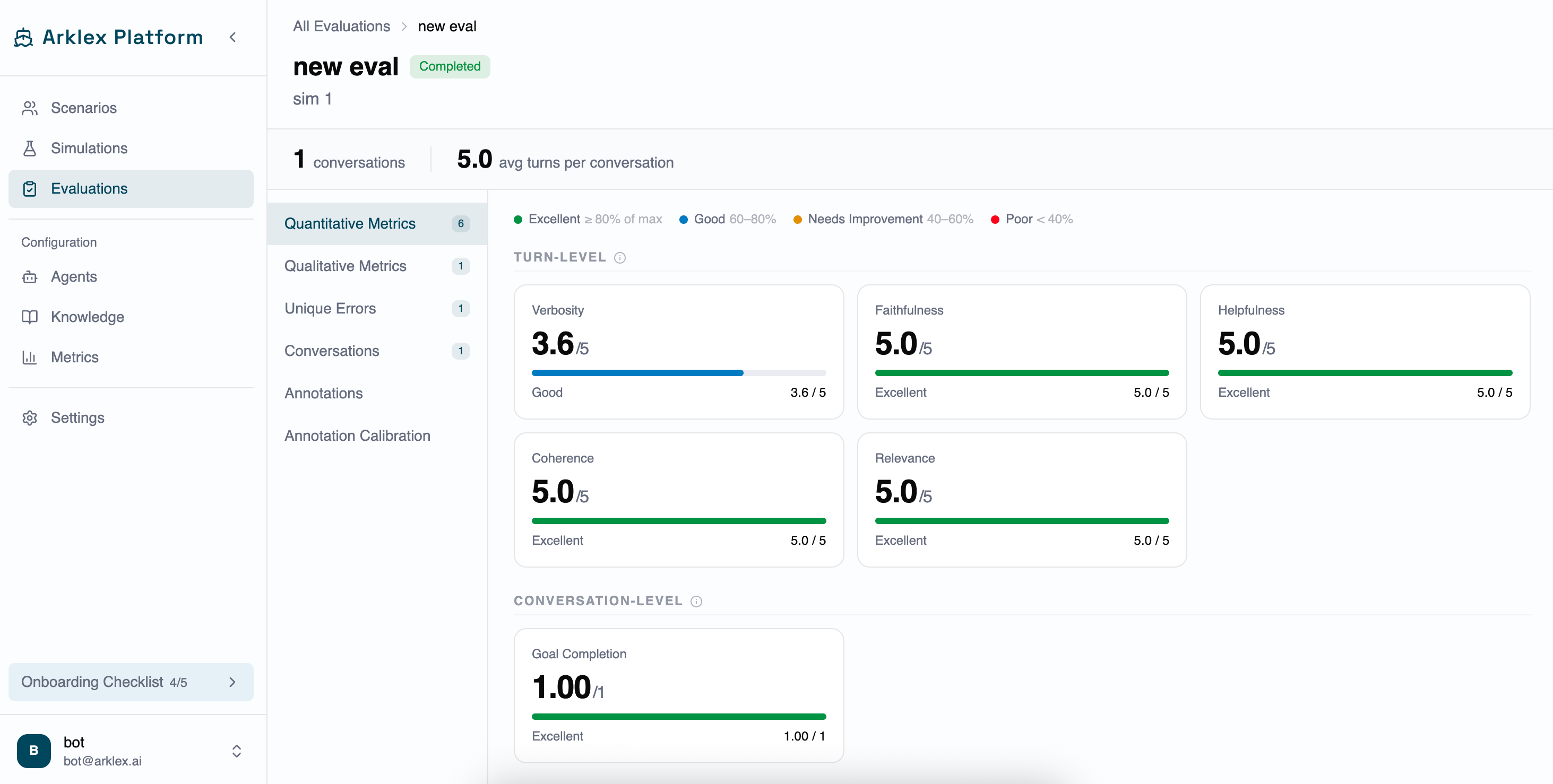
Shows a card for each numeric metric selected when the evaluation was created. Metrics are grouped into two sections: Turn-level (scored per assistant turn) and Conversation-level (scored once for the full conversation). Each card displays:- The metric name and score (e.g. 3.6/5 or 1.00/1 for Goal Completion).
- A progress bar visualizing the score.
- A band label indicating the score range.
| Band | Score threshold | Color |
|---|---|---|
| Excellent | ≥ 80% of max | Emerald |
| Good | 60-80% | Sky blue |
| Needs Improvement | 40-60% | Amber |
| Poor | < 40% | Rose |
Qualitative Metrics
For metrics that produce categorical labels (e.g. sentiment, tone, response type), this section shows the label distribution across all conversations. Expand a label row to see the conversations and turns where that label was assigned, then click a link to open the conversation modal at that turn.Errors
Lists behavioral failures detected by the LLM judge, grouped by severity.| Severity | Color |
|---|---|
| Critical | Red |
| High | Orange |
| Medium | Amber |
| Low | Indigo |
- The severity and category.
- How many times the error occurred (e.g. “9 occurrences”).
- A description of the problematic behavior.
- A suggested fix, if the judge provided one.
- Links to the specific conversations and turns where the error was observed.
Conversations
A table of all conversations scored in this evaluation.| Column | Description |
|---|---|
| Scenario | The scenario ID that generated the conversation |
| Goal | The simulated user’s goal |
| Goal Completion | How well the conversation achieved the stated goal (0-1 scale) |
| Final Score | The overall conversation score (0-1 scale) |
| Simulation | Which simulation this conversation came from |
| Status | Done, Running, or Failed |
Conversation modal
Expand the Reasoning section on any assistant turn to read the LLM judge’s explanation for that score — useful for identifying prompt improvements or metric calibration issues. Use the Previous and Next arrows to cycle through all conversations in the evaluation without closing the modal.Conversation status
| Status | Meaning |
|---|---|
| Done | The conversation completed and the agent performed acceptably. |
| Running | The conversation is still being scored. |
| Failed | The conversation did not complete or the agent failed critically. |
Annotations and calibration
The evaluation detail page includes an Annotations tab for human review and an Annotation Calibration tab showing agreement rates between the LLM judge and human reviewers. See Annotations for full details.Rerunning an evaluation
Click the kebab menu on any evaluation row and select Rerun. The rerun sheet pre-fills the evaluation name and shows a summary of the original configuration (simulations, metrics, model). Edit the name to distinguish this run, then click Run Evaluation. The rerun creates a new evaluation record. It uses the same simulations and metrics as the original.FAQ
Can an evaluation cover multiple simulations?
Can an evaluation cover multiple simulations?
Yes. The simulation selector supports multiple selections. This is useful for rolling up results from several simulation runs into a single scored view.
How are scores normalized?
How are scores normalized?
Scores are on a 1-5 scale where 5 is the best possible performance. The exact scoring criteria depend on the metric definition and the LLM judge’s interpretation of the rubric.
What is Goal Completion scored on?
What is Goal Completion scored on?
Goal Completion is scored 0-1 rather than 1-5. A score of 1.0 means the simulated user’s stated goal was fully achieved by the end of the conversation.
How do I improve a metric that consistently scores low?
How do I improve a metric that consistently scores low?
Start with the Errors tab to find specific behavioral failures. Review the conversations linked to each error to understand the pattern. Then update your agent’s system prompt, knowledge base, or configuration to address the root cause. Re-run the simulation and evaluation to confirm the improvement.